Passkeys

Create and sign in with passkeys, the modern, phishing-resistant alternative to passwords.

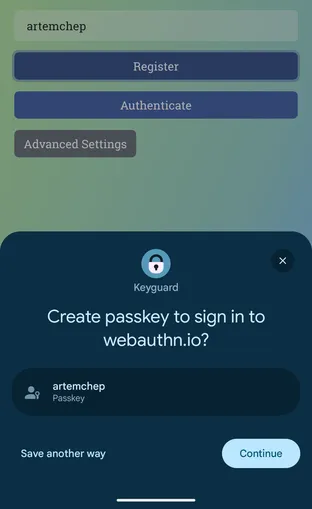
On Android, Keyguard registers as a system credential provider, so it can create passkeys and sign in with them. On Wear OS it can sign in with passkeys already in your vault. A passkey is bound to the site that issued it, so there is no password for a lookalike page to collect.

Each passkey lives in your vault next to your logins. You can inspect a passkey’s details or export it to a file.

Creating a passkey for a website during account sign-up

Watchtower can also point out sites that support passkeys where you haven’t created one yet, so you know where to add them. To register Keyguard as your device’s passkey provider, see the autofill & passkeys guide.

A passkey item stored in the vault next to other login entries

The passkeys reference walks through WebAuthn registration and sign-in, the generic info about passkeys and why a breach of the site’s server leaves an attacker nothing reusable.