Shortcuts, placeholders & URL overrides
Automate repetitive actions and tailor how items match and fill across sites.
Three tools for customizing how items behave:
- Shortcuts run the most common actions from the keyboard.
- Placeholders are tokens that expand into the item’s own data at the moment you use it.
- URL overrides add a button next to a matching URL that opens a rewritten version of it, or launches a local program.
Shortcuts
Common actions are a keystroke away (⌘ on macOS, Ctrl elsewhere):
Ctrl/⌘ + Shift + Space    Open Quick search
Ctrl/⌘ + Shift + L        Lock the vault
Ctrl/⌘ + N                Create a new item
Ctrl/⌘ + C                Copy username / primary field
Ctrl/⌘ + Shift + C        Copy password
Ctrl/⌘ + Alt + C          Copy one-time password
See the full shortcut reference for the complete list.
Placeholders
Placeholders follow the KeePass spec and expand inside URL fields and URL override commands, resolving to the item’s data the moment you use it:
https://example.com?user={username} → https://example.com?user=joeBeyond the core fields, you can reach custom fields, parts of the URL, and the current time:
{username}     the item's username
{s:license}    a custom field named "license"
{url:host}     the host part of the item's URL
{dt_simple}    a sortable timestamp, e.g. 20240101170534
Every placeholder, including text transformations and date components, is listed in the placeholder reference.
URL overrides
A URL override rewrites a link using a regex and a command (which can contain placeholders). For example, give every insecure link a button that opens it over HTTPS:
Regex:    ^http://.*
Command:  https://{url:rmvscm}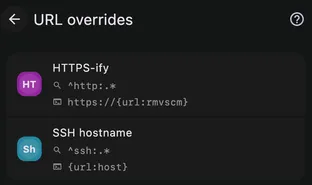
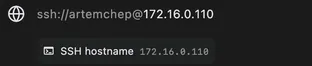
More examples, including launching local programs, are in the URL override guide.